五子棋(双人-单机)

1、概述

之前因为某种原因被要求开发五子棋的双人对战,以及人机对战,短时间没有开发出来,后来发现,实现AI 人机对战会困难一点,会用到一些算法(例如:基于博弈树的五子棋算法)

本文主要讲一下五子棋前端界面以及落子动作的实现,并不会涉及到AI 的算法实现部分,游戏的模式为单机双人对战模式。涉及的知识只有HTML CSS JS,容易上手。

2、实现布局

实现布局采用canvas画布去绘制界面。主要包含两个实现的要点,棋盘的绘制、棋子的绘制。

  • HTML 结构 以及 样式
1
2
3
4
5
6
7
<div class="wrapCanvas">
<div class="steps" id="stepBox">
<div>我方棋子数:<span id="meNum">0</span></div>
<div>对方棋子数:<span id="friendNum">0</span></div>
</div>
<canvas id="canvas"></canvas>
</div>
1
2
3
4
5
6
7
8
9
10
11
12
13
14
15
16
17
18
19
20
21
22
23
24
25
html,body{
margin:0;
padding:0;
background-color: #eee;
}

#canvas{
box-shadow: 0px 0px 10px 2px #ccc;
position: absolute;
left:0;
right:0;
top:0;
bottom:0;
margin: auto;
background-color: #ccc;
cursor:move;
}
.steps{
position: fixed;
left:50px;
top:50%;
font-size: 20px;
font-weight: bold;
color:red;
}
  • 棋盘的绘制

根据画布的宽高/棋盘格子的宽和高=格子的数量,从而绘制相应的格子。首先一个名为index.js的JS文件中,添加如下配置信息。

1
2
3
4
5
6
7
8
9
10
11
//配置信息
config = {
canvasW: 570, //画布宽
canvasH: 570,//画布高
gridW: 30,//格子宽
gridH: 30,//格子宽
me: true,//我方还是对方 下棋的标志
tagBoard:[],//棋盘上已经落子的格子
meNum:0,//我方落子数量
friendNum:0//对方落子数量
};

接着在index.js文件中添加init 方法,作为整个脚本文件的直行入口。

1
2
3
4
5
6
7
8
9
10
11
12
13
//主入口
window.onload = function(){
init(config);
}
//初始化方法
function init(config){
var canvas= document.getElementById("canvas");
canvas.width = config.canvasW;
canvas.height = config.canvasH;
var context = canvas.getContext("2d");
//画棋盘
drawBoard(context, config);
}

然后创建一个drawBoard方法,主要就是绘制横线和竖线。同时也初始化了tagboard,用于后面落子时,判断当前格子是否有棋子。

1
2
3
4
5
6
7
8
9
10
11
12
13
14
15
16
17
18
19
20
21
22
23
24
25
26
27
28
29
30
// 画棋盘
function drawBoard(ctx,config){
ctx.font="40px Arial";
ctx.fillStyle = "#ffc";
ctx.strokeStyle = "#222";
ctx.fillText("CHUXINRIZHI", Math.floor(config.canvasW / 2) - 125, Math.floor(config.canvasH / 2));
var rowNums = Math.floor(config.canvasH / config.gridH);
var colNums = Math.floor(config.canvasW / config.gridW);
//init tagboard
for(var row = 1; row < rowNums; row ++ ){
config.tagBoard[row] = [];
for(var col = 1; col < colNums; col ++ ){
config.tagBoard[row][col] = 0;
}
}
//draw row lines
for(var row = 1; row < rowNums; row ++ ){
ctx.beginPath();
ctx.lineTo(config.gridW, row * config.gridH);
ctx.lineTo(config.canvasW - config.gridW, row * config.gridH);
ctx.stroke();
}
//draw column lines
for(var col = 1; col < colNums; col ++ ){
ctx.beginPath();
ctx.lineTo(col * config.gridW, config.gridH);
ctx.lineTo(col * config.gridW, config.canvasH - config.gridH);
ctx.stroke();
}
}
  • 棋子的绘制以及下棋逻辑实现

接着就是棋子的绘制,调用canvas的arc方法画圆。下棋的逻辑比较简单,主要就是判断对我方执棋还是对方执棋。

首先在init 方法里添加棋盘点击事件,调用画棋子的方法。

1
2
3
4
5
6
7
8
9
10
11
12
13
14
15
16
17
18
  //初始化方法
function init(config){
var canvas= document.getElementById("canvas");
canvas.width = config.canvasW;
canvas.height = config.canvasH;
var context = canvas.getContext("2d");
//画棋盘
drawBoard(context, config);
//画棋子
canvas.onclick = function(e){
var noset = e.offsetX < config.gridW ? false : e.offsetY < config.gridH ? false :true;
if(noset){
var xy = judgeMouseXY(e.offsetX, e.offsetY,config);
// console.log(xy)
drawChess(context, config, xy[0], xy[1],xy[2],xy[3], config.me);
}
}
}

然后继续实现画棋子的方法,创建一个drawChees的方法:

1
2
3
4
5
6
7
8
9
10
11
12
13
14
15
16
17
18
19
20
21
22
//❀棋子
function drawChess(ctx, config, x, y, tagX, tagY,isMe){
var curGrid = config.tagBoard[tagX][tagY];
if(curGrid === 1 || curGrid === 2){
return;
}
ctx.beginPath();
if(isMe){
ctx.fillStyle = "#222";
config.tagBoard[tagX][tagY] = 1;
config.meNum ++;
}else{
ctx.fillStyle = "#fff";
config.tagBoard[tagX][tagY] = 2;
config.friendNum ++;
}
ctx.arc(x, y, Math.floor(config.gridW / 2), 0, Math.PI * 2);
ctx.fill();
config.me = !config.me;
document.getElementById('meNum').innerText = config.meNum;
document.getElementById('friendNum').innerText = config.friendNum;
}

实现棋子落在准确的位置上,需要特别注意的是需要以棋盘上的横线和竖线的交叉点为圆心进行一个半径为格子宽度一般的圆来判断落子的合法区域,在init方法里调用drawChees 方法前判断棋子的落下点,这里我们实现一个judgeMouseXY 方法,即判断鼠标点的区域是否是我们上面说的圆的区域内。

1
2
3
4
5
6
7
8
9
10
11
12
13
14
15
16
17
18
19
20
21
22
23
24
  //判断鼠标的位置
function judgeMouseXY(x, y, config){
var cordinates = [[0,0],[1,0],[0,1],[1,1]];
var offsetD = Number.MAX_VALUE;
var index = -1;
var tmpX = x / config.gridW - Math.floor(x / config.gridW);
var tmpY = y / config.gridH - Math.floor(y / config.gridH);
for(var i = 0; i < cordinates.length; i++){
var curNum = Math.sqrt(Math.pow(tmpX - cordinates[i][0], 2) + Math.pow(tmpY - cordinates[i][1], 2));
if(offsetD > curNum){
offsetD = curNum;
index = i;
}
// console.log(curNum)
}
if(index !== -1){
tmpX = (cordinates[index][0] + Math.floor(x / config.gridW));
tmpY = (cordinates[index][1] + Math.floor(y / config.gridH));
}else{
tmpX = Math.floor(x / config.gridW);
tmpY = Math.floor(y / config.gridH);
}
return [tmpX * config.gridW, tmpY * config.gridW, tmpX, tmpY];
}
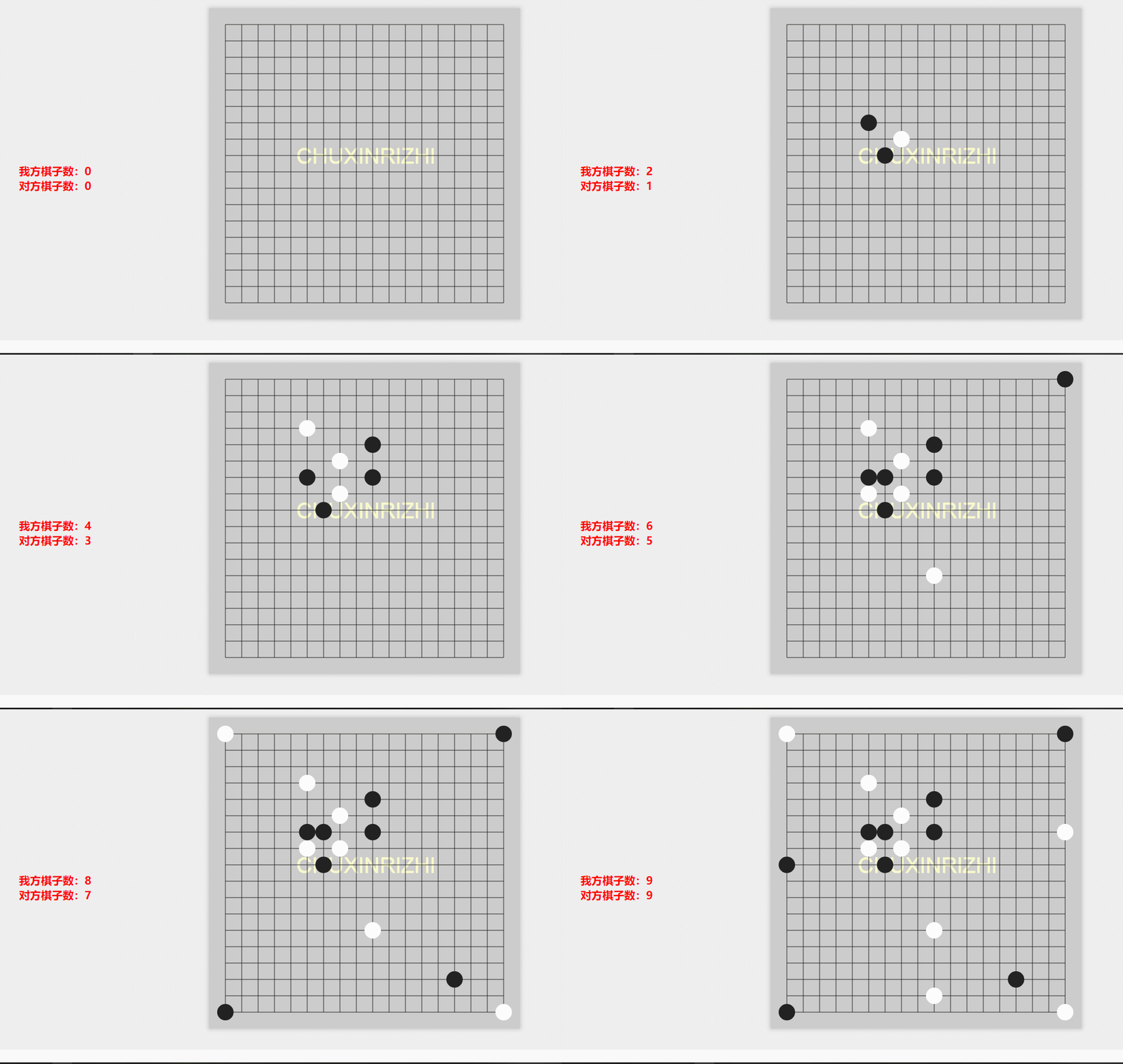
  • 最终实现的效果

    效果图

说在后面的话:

本文的五子棋并没有开发人机大战以及判断输赢,就当是留个好奇给大家,大家自行查阅相关资料,了解如何去实现!加油,前端er。

下载源码可以去:

源码下载

我的网站:初心日志

加油!!!!

坚持原创技术分享,您的支持将鼓励我继续创作!