跳一跳-极简模式

简述

微信跳一跳,long long ago的一个小游戏,火爆连天,想想我也不妨实现一个只胜不败的跳一跳【kuzhuai】,哈哈哈,说些就写,噼里啪啦噼里啪啦,具有极简代码风的”跳一跳”终于出炉。

效果图
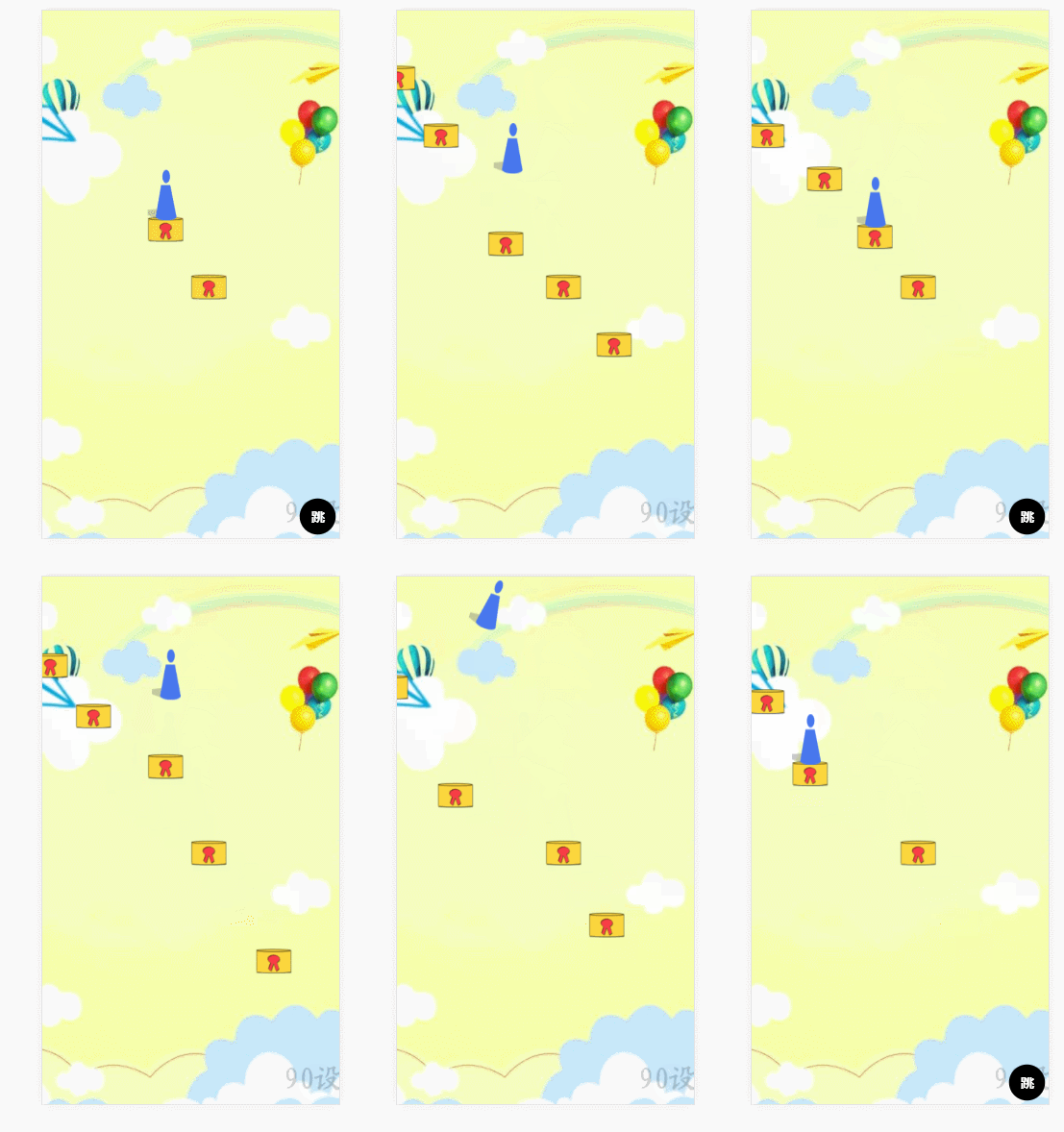
跳一跳效果图
github地址 (戳我)

实现流程

  • 基本布局
1
2
3
4
5
6
7
8
9
10
11
12
13
14
15
16
17
18
19
20
21
22
  <!DOCTYPE html>
<html lang="en">
<head>
<meta charset="UTF-8">
<meta name="viewport" content="width=device-width, initial-scale=1.0">
<meta http-equiv="X-UA-Compatible" content="ie=edge">
<title>跳一跳</title>
<link rel="stylesheet" href="index.css">
</head>
<body>
<div class="viewport">
<div class="view-layer">
<div class="role"></div>
</div>
<div class="jump" title="按住以不同力度跳跃"></div>
<!-- <div class="power" title="力度">
<span class="bar"></span>
</div> -->
</div>
<script src="index.js"></script>
</body>
</html>
1
2
3
4
5
6
7
8
9
10
11
12
13
14
15
16
17
18
19
20
21
22
23
24
25
26
27
28
29
30
31
32
33
34
35
36
37
38
39
40
41
42
43
44
45
46
47
48
49
50
51
52
53
54
55
56
57
58
59
60
61
62
63
64
65
66
67
68
69
70
71
72
73
74
75
76
77
*{margin:0;padding:0}
html,body{
background:url('https://ss0.bdstatic.com/70cFuHSh_Q1YnxGkpoWK1HF6hhy/it/u=3910698639,2661057407&fm=26&gp=0.jpg') no-repeat;
background-size: cover;
background-position: center;
font-size: 14px;
font-family:'Segoe UI', Tahoma, Geneva, Verdana, sans-serif;
width:100%;
height:100%;
}

.viewport{
position: relative;
width:100%;
height:100%;
overflow: hidden;
}

.view-layer{
position: absolute;
width:100%;
height: 100%;
z-index: 100;
transition: all 1s ease-in;
transform-origin: left;
}
.view-layer .plateform{
position: absolute;
width:50px;
}
.view-layer .plateform img{
width:50px;
}

.role{
position: absolute;
background-image: url(role.png);
background-size:100% 100%;
background-position: 0 0;
width:40px;
height:70px;
transition: all .5s linear;
transform-origin: bottom;
z-index: 102;
}

.jump{
position: absolute;
z-index: 101;
width:50px;
height:50px;
border-radius: 50%;
background-color: black;
color: #fff;
font-size: 18px;
font-weight: 700;
text-align: center;
line-height: 50px;
right:5px;
bottom:5px;
cursor: pointer;
transition: all .3s linear;
}
.jump:hover{
color: #000;
background-color: #fff;
border:solid 1px #000;
}
.power{
position: absolute;
display: inline-block;
z-index: 101;
right:20px;
bottom:60px;
width:20px;height:200px;
background-color: #000;
}
  • 角色跳动
  • 跳台生成
  • 背景移动

封装getEle方法,和一些配置信息

1
2
3
4
5
6
7
8
9
10
11
12
13
14
15
16
17
18
19
20
21
22
23
24
25
26
27
28
var getEle = (function(obj){
return function(ele, isList){
return isList ? obj.querySelectorAll(ele) : obj.querySelector(ele);
}
})(window.document);

var conf = {
//场景
plateformBox : getEle(".view-layer"),
//初始跳台
firstTai : getEle('#firstTai'),
//屏幕宽高
screenW : window.document.body.offsetWidth || widow.document.documentElement.clientWidth,
screenH: window.document.body.offsetHeight || widow.document.documentElement.clientHeight,
//跳台随机生成距离
stepLenRange: [60,70,80,90,100,110,120,150],
//前后两个相邻跳台坐标
startX:150,
startY:150,
nextX:150,
nextY:150,
//跳跃次数,用于角色翻转角度计算
count:0,
deg:0,
timer:null,
jump: getEle('.jump'),
role: getEle(".role"),
}

封装生成坐标方法

1
2
3
4
5
6
7
8
9
10
11
12
13
14
15
16
17
18
19
20
21
22
23
24
25
26
27
28
29
30
31
32
33
34
35
36
37
38
39
40
41
42
43
44
45
46
47
48
/*生成坐标 */
function genAxies(noJump){
//生成坐标
var genRadomAxies = function(){
var getRangeNum = function(obj){
return obj.stepLenRange[Math.floor(Math.random()*obj.stepLenRange.length)];
}
conf.startX = conf.nextX;
conf.startY = conf.nextY;
conf.nextX += getRangeNum(conf);
conf.nextY += getRangeNum(conf);

var axies = [conf.startX,conf.startY,conf.nextX,conf.nextY];
console.log(axies)
conf.count++;
var BoxMoveXY=[
(-conf.nextX+ Math.floor(conf.screenW / 2)),
(-conf.nextY+ Math.floor(conf.screenH / 2))
];
conf.plateformBox.style.cssText = "transition:all .5s linear 1.1s;transform:translate("+BoxMoveXY[0]+"px,"+BoxMoveXY[1]+"px)";
return axies;
}
//生成站台
var randomPlateform = function(noJump){
var axies = genRadomAxies();
var buildTpl = function(axis){
console.log('build',axis)
for(var i = 0; i < axis.length; i += 2){
var odiv = document.createElement("div");
odiv.setAttribute("class","plateform");
var oimg = document.createElement("img");
oimg.setAttribute("src","tai.png");
odiv.appendChild(oimg);
odiv.style.cssText="left:"+axis[i]+"px;top:"+axis[i+1]+"px;";
conf.plateformBox.appendChild(odiv);
}
}
if(conf.startX == conf.startY){
buildTpl(axies);
}else{
buildTpl([axies[2],axies[3]]);
}
/* 调用翻身动画 */
!noJump ? jumpAnimate(axies,900) : false;
}
/*真正开始运行 */
randomPlateform(noJump);
}

需要注意的就是,角色在跳跃时有一个需要翻转的动画效果,起初用的是setInterval,发现很不流畅,卡顿很明显,便采用了requestAnimationFrame来实现动画的效果。

1
2
3
4
5
6
7
8
9
10
11
12
13
14
15
16
17
/*跳动动画*/
function jumpAnimate(axis,topLen){
cancelAnimationFrame(conf.timer);
conf.timer = requestAnimationFrame(function fn() {
if (conf.deg <= 360*conf.count) {
if(conf.deg < 180*(2*conf.count-1)){
conf.role.style.cssText="left:"+axis[0]+"px;top:"+ (axis[1]-65-topLen)+"px;transform:rotate("+conf.deg+"deg)";
}else{
conf.role.style.cssText="left:"+axis[0]+"px;top:"+(axis[1]-65)+"px;transform:rotate("+conf.deg+"deg)";
}
conf.deg +=20;
conf.timer = requestAnimationFrame(fn);
} else {
cancelAnimationFrame(conf.timer);
}
});
}

最后调用方法,实现应用的运行。

1
2
3
4
5
6
7
8
9
10
window.onload = function(){
genAxies();
conf.jump.onclick = function(){
conf.jump.style.display="none";
genAxies();
setTimeout(function(){
conf.jump.style.display="";
},1500)
}
}
坚持原创技术分享,您的支持将鼓励我继续创作!